WebWork Introduces Device Compliance Monitoring, Checking Encryption, Antivirus and Screen Lock Across Every Machine
WebWork's desktop app now reports encryption, antivirus, auto-updates, screen lock and password manager status on every
Press Release Disclaimer: This is a press release distributed through the XPR Media network. It has not been independently verified by our newsroom.
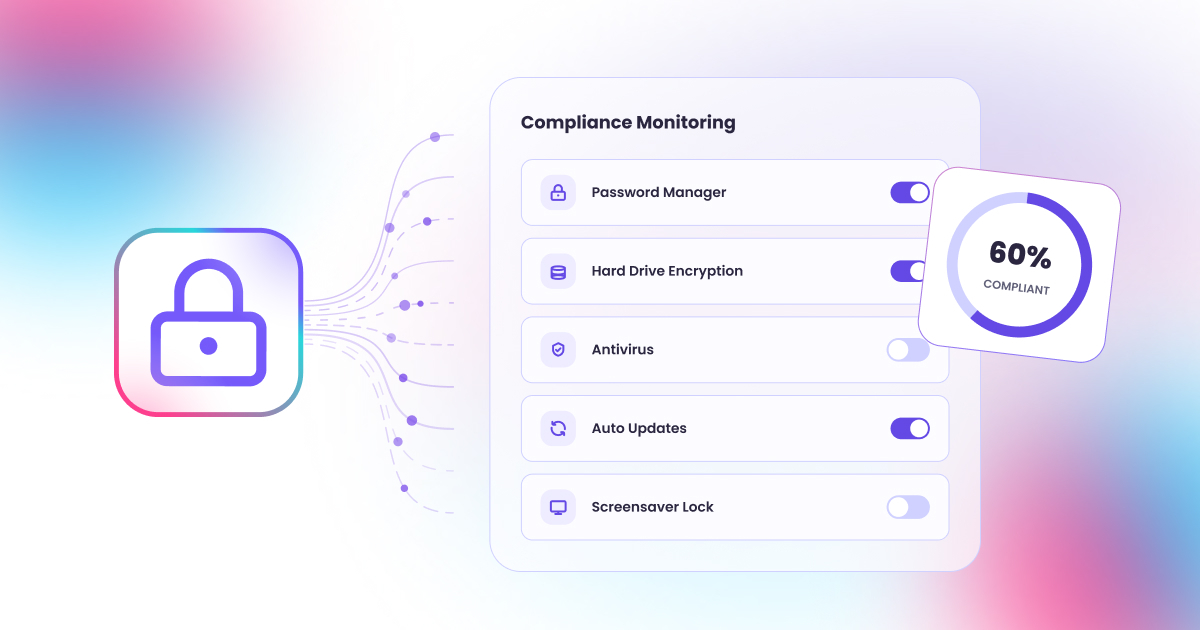

WebWork’s desktop app now reports encryption, antivirus, auto-updates, screen lock and password manager status on every computer. It reports, never changes.
WILMINGTON, DE, UNITED STATES, September 24, 2026 /EINPresswire.com/ — WebWork Time Tracker now checks how secure each employee’s computer is. Device compliance monitoring uses the same desktop app the team already runs to track time, so nothing extra gets installed. Six checks run on every machine: hard drive encryption, antivirus, automatic updates, screen lock, password manager and external storage. The results show up as one compliance rate for the whole workspace. The app reads settings only. It never changes them.
Each check is designed to ensure you stay aware of your team’s device compliance status. Is the hard drive encrypted, so a stolen laptop doesn’t lead to data breach. Is antivirus running. Does the machine install its own security updates. Does the screen lock when someone walks away. Does the person use a password manager instead of the same password everywhere. Is anyone copying files to a USB drive. While these may seem simple questions at first, they are not so easy to monitor manually when you have a remote team.
On WebWork, you can find compliance in Members > Compliance tab. It shows where everyone stands across every device checked in the last 90 days, with the failing points visible right there. Someone working on both a laptop and a desktop appears once, with both machines counted, so the rate reflects people rather than hardware. The Devices and Assets tab on each profile breaks it down per machine, which is where an administrator looks once a name is flagged. You set up the checks in Settings so only those are monitored which are required by your company policy. Devices that should not count, including personal machines, can be left out.
The main requirement for compliance monitoring usually comes from the outside. It can be a client that sends a security questionnaire before signing, a cyber insurance policy that comes up for renewal with questions about laptops attached to the price, or a laptop might go missing, and whether the drive was encrypted decides whether that is an internal problem or something the company has to report.
Companies preparing for SOC 2, ISO 27001, PCI DSS, HIPAA, GDPR or CCPA are asked to show the same things about their employees’ devices. Auditors want proof the machines met the standard over time, not on the morning of the review. A rolling 90-day record of every machine is exactly that.
Any device can also be added to the company asset register in one click. WebWork fills in the brand, model, processor, RAM, storage, operating system and device ID on its own, assigns the machine to the person using it, and marks it In Use. The asset page keeps its own compliance block, so a company can start from the laptop or from the person and reach the same answer. Asset management is available on the Plus plan and above.
What it does not do is just as deliberate. There is no remote wipe, no pushed settings, no forced changes and no control over anyone’s machine. That is the line between reporting and device management, and it is why the feature can run on machines employees also use personally without becoming a fight. Companies already running a full MDM will keep it, since reporting does not replace management. Companies without one get the evidence without the deployment project that buying an MDM involves. Employees are informed and sign in themselves, so no machine is checked without its owner knowing, a rule that runs through WebWork’s approach to employee monitoring privacy.
Compliance Monitoring is available on the Premium plan and above, or as an add-on at $1 per user per month.
WebWork Time Tracker is an AI-powered time tracking, productivity monitoring and workforce management platform. It runs on Windows, macOS, Linux, iOS, Android, web, a Chrome extension, along with a Time Clock Kiosk, covering time tracking, screenshots, app and website monitoring, attendance, GPS and geofencing, project and task management, invoicing and payroll. WebWork AI is built into the platform and included on all plans. Founded in 2016, WebWork is trusted by 32,000+ companies across 165 countries.
Kate Calloway
WebWork AI, Inc.
+1 401-388-4316
email us here
Visit us on social media:
LinkedIn
Instagram
Facebook
YouTube
X
Legal Disclaimer:
EIN Presswire provides this news content “as is” without warranty of any kind. We do not accept any responsibility or liability
for the accuracy, content, images, videos, licenses, completeness, legality, or reliability of the information contained in this
article. If you have any complaints or copyright issues related to this article, kindly contact the author above.

Media gallery